 ssok Launcher
 ssokEdit
 ssokIQ
 ssokCLI
 ssokMusic Free
 ssok Keyword Extractor
 ssokPlayer
 ssokKit
 SsokRecorder
ssokEdit Production Packs
Audiogram Production Pack (Free)
A ssokEdit production pack that turns your voice or music files into videos with waveforms that move to the sound (no AI)
Free
1-year license from the payment date · 1 PC(s) · Seller: Strokehub Co., Ltd.
Signed-in members can download this for free. Import the pack file (.ssokpack) in ssokEdit → Pack Manager → "Import pack file", or install it directly from Pack Manager → Market packs.
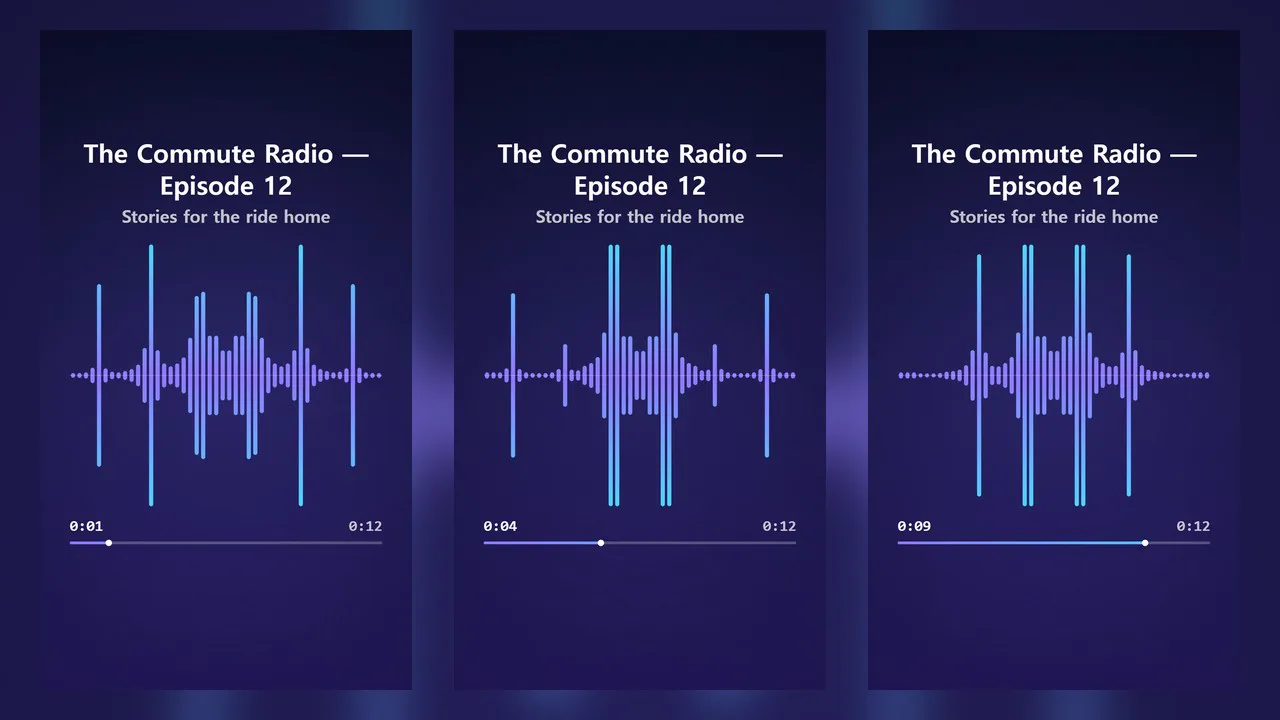
Add your own voice or music file and get a video with a waveform that moves to the sound.
Use it when you need to post audio-only content as a video. No AI is involved. It measures the loudness of your file and draws it directly, so the same file with the same settings always produces the same video.
- Waveform — The whole shape of the sound is laid out on screen, and the current position moves from left to right. The played part fills with color; the rest stays faint
- Bars — Bars split from low to high frequencies rise and fall with the sound
- Circle — A central circle grows with the sound while bars extend around its edge
- Waves — Layered waves change height with the loudness
- Title and second line — Shown exactly as you type them. Long text is shrunk to fit the screen width
- Time and progress bar — Elapsed time, total time, and a thin progress bar
- Four color themes — Night Sky · Sunset · Forest · Paper. Vertical and horizontal
- The result is added to the timeline as a separate "Audiogram" video and "Audio" track. The audio is your original file, unchanged
Use it for
- Posting a clip from a podcast or radio recording as a Short
- Preview videos for songs or performances you've made
- Posting voice memos, lecture recordings, or interview recordings as videos
Options when running
- Audio file — Required
- Style — Waveform / Bars / Circle / Waves
- On-screen title — Optional. If left blank, the one-line topic is used
- Second line — Optional. A show name or the performer's name
- Color theme — Night Sky / Sunset / Forest / Paper
- Beginning only — Optional. Enter something like "30초" or "1:30" to use only that length from the start of the file
Supported files
- Any audio file ssokEdit can read, such as mp3 · wav · m4a · flac · ogg.
- The video is as long as the audio. Videos can be up to 10 minutes; for longer files, only the first 10 minutes are used.
- To use a section from the middle, cut that section into its own file first. "Beginning only" always counts from the start.
- Frames are captured one at a time, so long files take a while. Try entering about 30 seconds in "Beginning only" first to check the look.
Good to know
- The audio is not altered. No volume leveling or noise removal — your file is used as is.
- Only use audio you have the rights to. Anyone who makes a video from someone else's song or broadcast is responsible for it.
- Speech is not transcribed. If you need subtitles, add them separately on the timeline.
- Photos and album art are not included.
- If you choose English as the language in the run window, the video is made for English — no fixed Korean text appears on screen, and the title and second line are used as typed (time shown as 1:05). The "Beginning only" field also accepts English, such as "30s" · "1m30s" · "2 minutes".
Requirements
- ssokEdit 1.3.2 or later (Windows)
- Microsoft Edge (included with Windows) — used to capture the frames