 ssok Launcher
 ssokEdit
 ssokIQ
 ssokCLI
 ssokMusic Free
 ssok Keyword Extractor
 ssokPlayer
 ssokKit
 SsokRecorder
Quiz Creation Pack (Free)
A ssokEdit production pack that turns a one-line topic into multiple-choice, initial-consonant (chosung), or rapid-fire O/X quiz Shorts
Free
1-year license from the payment date · 1 PC(s) · Seller: Strokehub Co., Ltd.
Signed-in members can download this for free. Import the pack file (.ssokpack) in ssokEdit → Pack Manager → "Import pack file", or install it directly from Pack Manager → Market packs.
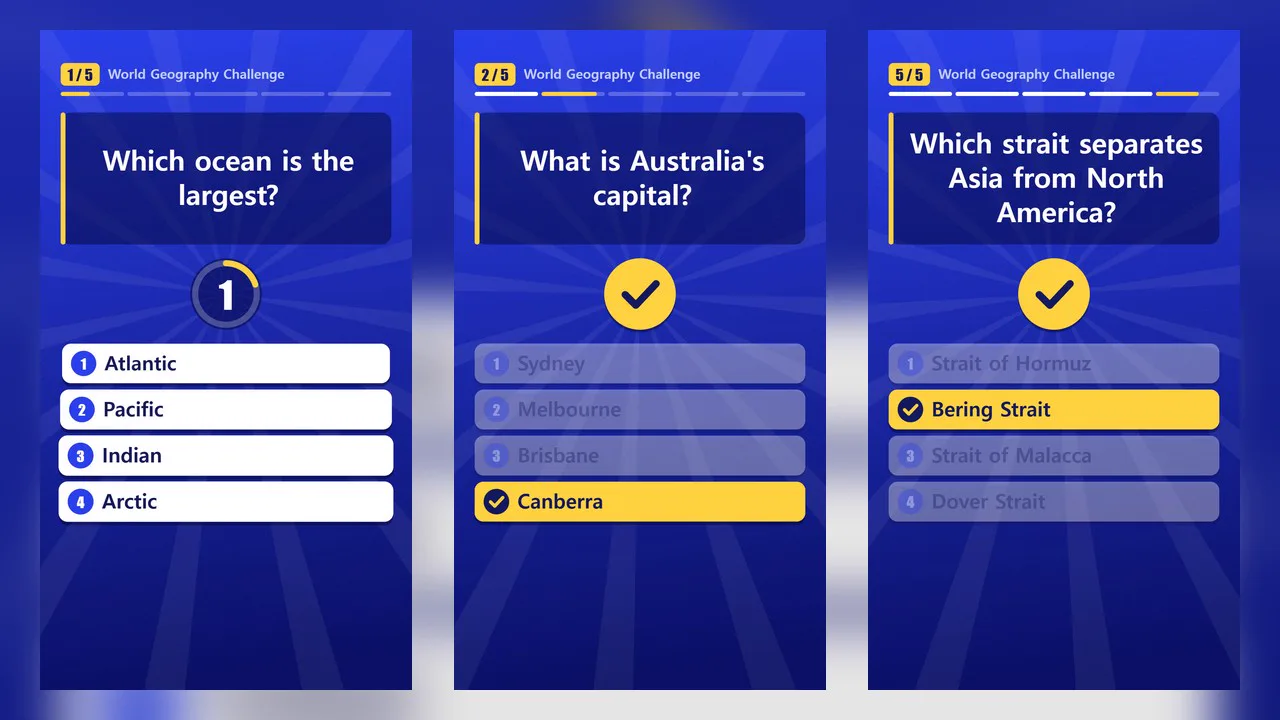
Enter a single-line topic and get an interactive quiz video viewers can play along with. Choose from three formats: multiple choice, chosung (Korean initial-consonant) quiz, and rapid-fire O/X.
Viewers solve the quiz along with the video as they watch. Everything is built from text and shapes, with no photos. The AI doesn't write scene code, so videos render quickly and always look consistent. All three formats share the same color theme, countdown ring, and progress bar.
- Multiple choice (default) — The question appears in large text, and 2–4 numbered options appear one by one. After a silent countdown, the correct answer lights up with a check mark while the wrong ones fade. If the only options are O and X, they appear as large circle and cross tiles
- Chosung quiz — The initial consonants of the answer (김치찌개 → ㄱㅊㅉㄱ) appear in large letter tiles, with a one-line hint above. After the countdown, the tiles flip one by one to reveal the answer. The app extracts the initials from the answer itself. Spaces, numbers, and English letters are kept as is (「K팝 3대장」 → 「Kㅍ 3ㄷㅈ」)
- Rapid-fire O/X — A short statement slides in from the side, and after a brief countdown a big O or X stamp lands on it. The narration reads the answer and a one-line reason, then moves straight to the next statement. Great for chaining 7–10 statements quickly
- Narration — Reads the question (the hint, for chosung quizzes), stays silent during the countdown, then reads the answer
- Progress bar — Shows which question you're on, always visible at the top
- Final screen — "How many did you get right?" with a number row from 0 to the total number of questions
- Use your own list — Each format has a field for your own questions, which are used exactly as entered
- Three themes — Show Blue, Pop Pink, Mint Orange. Vertical and horizontal
- The result lands on the timeline as separate quiz video, narration, and subtitle tracks, so you can edit right away
Options when running
- Quiz topic — e.g., Tricky animal trivia, food name initials
- Format — Multiple choice / Chosung quiz / Rapid-fire O/X
- My questions (multiple choice) — Optional. One per line, up to 10.
Question | Option1 / Option2 / Option3 | Answer number | Explanation(explanation optional). For O/X questions, writeQuestion | O - My chosung questions (chosung quiz) — Optional. One per line, up to 10.
Answer | Hint(hint optional). e.g.,김치찌개 | 매운 국물 요리 - My O/X statements (rapid-fire O/X) — Optional. One per line, up to 10.
Statement | O or X | Reason(reason optional). e.g.,Penguins are birds | O | They can't fly, but they're feathered birds - Number of questions — 3 / 5 / 7 / 10 (or the number of lines in your list)
- Countdown — 3 sec / 5 sec / 2 sec (2 sec suits rapid-fire O/X)
- Difficulty — Easy / Medium / Hard (when the AI writes the questions)
- On-screen title and color theme
- Length — 45 seconds by default. Since the number of questions and countdown determine the length, many questions can make the video longer than the selected length
Good to know
- AI-generated questions and answers may be wrong. In rapid-fire O/X, the statements, O/X answers, and reasons are also AI-written facts and may be inaccurate. Always check them yourself before posting. If something's wrong, enter a corrected list in the matching "My …" field and generate again.
- When you provide your own list, the AI only writes the title, intro, and outro. At answer reveal, it reads "The answer is number 2, ○○." / "The answer is 김치찌개." / "The answer is O." followed by your explanation or reason as written.
- In chosung quizzes, AI-generated answers are dropped if they contain many non-Korean characters, aren't 2–8 characters long, or are duplicates. Hints that contain the answer are removed. Your own chosung questions are used as is, so an answer with no Korean characters will show initials identical to the answer.
- In multiple choice, lines with fewer than 2 options or an answer number outside the option range are skipped; in rapid-fire O/X, lines without a readable O or X are skipped.
- Questions and statements look best under 40 characters. Longer ones are shrunk and split across lines. Long chosung answers get smaller tiles or multiple lines.
- Photo, logo, and picture questions aren't supported.
- English videos — Choose English in the run window and the questions, options, narration, and on-screen text (question count, how many you got right) will all be in English. The chosung quiz relies on Korean initials, so it's only available for Korean videos (you'll be notified right away if you choose English).
Requirements
- ssokEdit 1.3.2 or later (Windows)
- Microsoft Edge (included with Windows) — used to capture the screens