 ssok Launcher
 ssokEdit
 ssokIQ
 ssokCLI
 ssokMusic Free
 ssok Keyword Extractor
 ssokPlayer
 ssokKit
 SsokRecorder
ssokEdit Production Packs
TOP N Ranking Pack (Free)
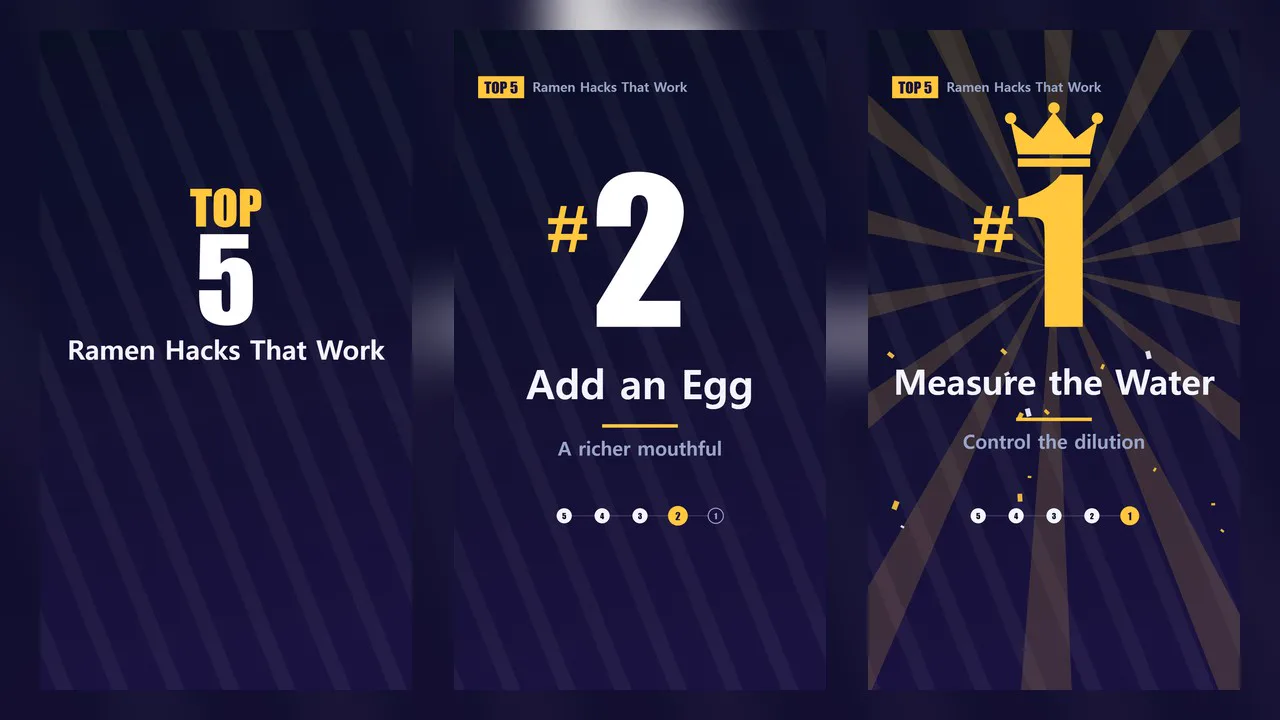
A ssokEdit production pack that turns a one-line topic into a TOP N ranking video, revealing entries from last place to #1 with flipping numbers
Free
1-year license from the payment date · 1 PC(s) · Seller: Strokehub Co., Ltd.
Signed-in members can download this for free. Import the pack file (.ssokpack) in ssokEdit → Pack Manager → "Import pack file", or install it directly from Pack Manager → Market packs.
Enter a single-line topic and get a countdown video that reveals each entry from last place to #1, with big numbers flipping into view.
This ranking video uses only numbers and text, with no photos. The AI doesn't write scene code, so it's fast and always looks clean.
- Flip-number reveals: The previous number flips up and the new one drops in, followed by the name and a short comment
- Ranking bar: Number circles at the bottom fill in one by one so you can always see how far along you are
- #1 finale: Crown, light rays and confetti
- Final leaderboard: The full ranking appears on one screen along with a closing line
- Use your own ranking: Enter your list and only the script is written, without changing names or order
- Three themes: Night Sky Gold · Pop Yellow · Black Red, in vertical and horizontal
- English videos: Choose English in the run window to get the script, voice and on-screen text ("#1" instead of "1위") in English
- The result lands on the timeline as separate ranking video, narration and subtitle tracks, ready to edit
Options when you run it
- What to rank: e.g. Ways to make better ramen
- Your ranking: Optional. One per line starting from #1, up to 10
- Number of entries: 3 / 5 / 7 / 10
- Tone: Informative / Entertaining / Chatty and relatable
- Screen title · Screen color
- Length: 45 seconds by default
Good to know
- AI-generated rankings are the AI's opinion, not research results. Please verify them yourself before presenting them as fact.
- Photos, logos and product images are not included.
Requirements
- ssokEdit 1.3.2 or later (Windows)
- Microsoft Edge (included with Windows by default), used to capture the screen