 ssok Launcher
 ssokEdit
 ssokIQ
 ssokCLI
 ssokMusic Free
 ssok Keyword Extractor
 ssokPlayer
 ssokKit
 SsokRecorder
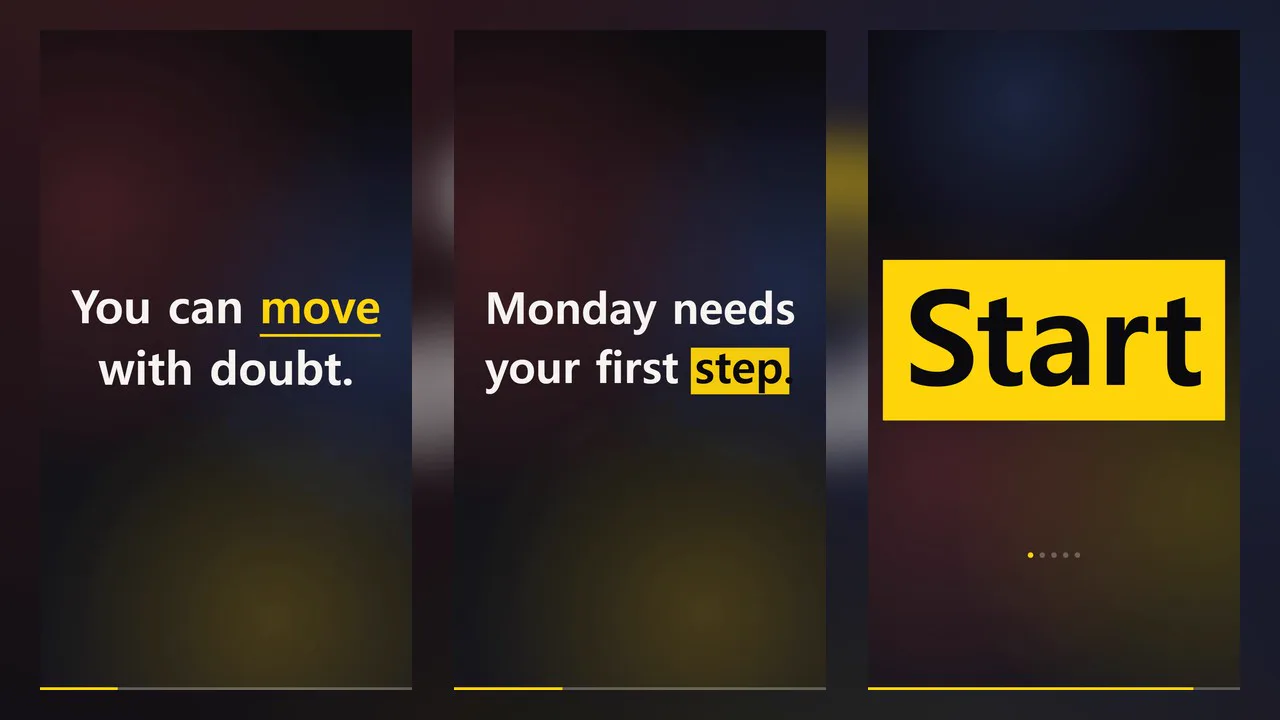
Kinetic Typography Production Pack (Free)
A ssokEdit production pack that turns a one-line topic or your own text into a type-driven video where words pop onto the screen in rhythm.
Free
1-year license from the payment date · 1 PC(s) · Seller: Strokehub Co., Ltd.
Signed-in members can download this for free. Import the pack file (.ssokpack) in ssokEdit → Pack Manager → "Import pack file", or install it directly from Pack Manager → Market packs.
Create videos where the text is the star. Enter a one-line topic or your own text, and each word pops up to fill the screen right as it's spoken.
These videos use nothing but text — no images, no subtitles. They work great for quotes, personal resolutions, video opening hooks, lyrics, and event announcements. Because the AI doesn't write scene code, generation is fast and the screen always looks clean.
- Five animation styles — Fill the screen, slam in word by word, push up, typewriter, and highlighter. The AI picks the style that suits each line
- Emphasized words — The key word in each line appears in an accent color
- Your text, untouched — Enter quotes, lyrics, or a script and only the animation is added; not a single character is changed
- Voice or silent — Sync to a narration voice, or animate text only so you can add music
- Words appear as they're spoken — The narration is transcribed on your computer (no internet needed), so each word appears the moment it's spoken. The on-screen text is your original script, not the transcription
- Four themes · three fonts — Black Yellow · Paper Red · Navy Mint · Purple Sunset; Gothic · Myeongjo · Gungseo
- The result lands on the timeline as separate text video and voice tracks, ready to edit
Options when running
- What to say — e.g. A few words to hear on Monday morning
- Your text — Optional. One line per screen
- Tone — Firm / Warm / Funny / Ad-style
- Sound — Read aloud / Silent
- Word timing — Sync to voice (transcription) / Estimate by character count
- Screen colors · font
- Length — 30 seconds by default
Good to know
- "Sync to voice" uses ssokEdit's auto subtitles (transcription tool). You need to set up auto subtitles once in the Subtitles tab; if it isn't set up, generation won't stop — it falls back to estimating by character count as before. This production pack does not download a transcription model.
- Transcription adds about 1–2 seconds per line (measured on a 12-thread PC with the Base model — about 10–20 extra seconds for a 30-second video).
- Lines the transcription struggles with (e.g. lots of numbers or foreign words) are estimated by character count for that line only. The run notes show how many lines were synced.
- When creating in "Silent" mode or choosing "Estimate by character count," word timing is estimated from character count and may be slightly off from the voice.
- For lyric videos, create in "Silent" mode, then adjust line lengths on the timeline to match the song. Song tempo is not matched automatically.
- If you use someone else's lyrics or writing, please check the copyright yourself before uploading.
- English videos — Choose English in the run window and the text and voice will be in English, with more characters per line to fit English word lengths.
Requirements
- ssokEdit 1.3.2 or later (Windows)
- Microsoft Edge (included with Windows) — used to capture the screen
- ssokEdit auto subtitles (transcription) set up, to sync word timing to the voice — optional