 ssok Launcher
 ssokEdit
 ssokIQ
 ssokCLI
 ssokMusic Free
 ssok Keyword Extractor
 ssokPlayer
 ssokKit
 SsokRecorder
Text Chat Production Pack (Free)
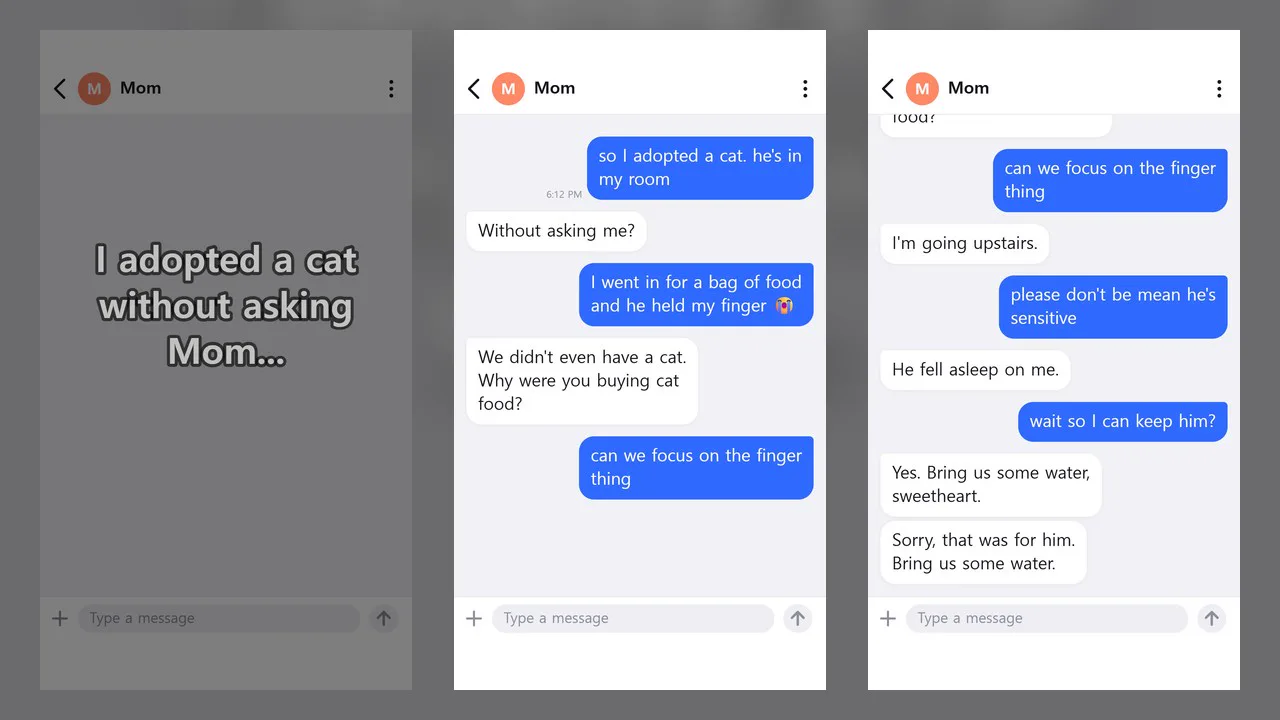
A ssokEdit production pack that turns a one-line topic into a messenger-chat Short where bubbles pop up one by one, read aloud with a different voice for each person
Free
1-year license from the payment date · 1 PC(s) · Seller: Strokehub Co., Ltd.
Signed-in members can download this for free. Import the pack file (.ssokpack) in ssokEdit → Pack Manager → "Import pack file", or install it directly from Pack Manager → Market packs.
Enter a single-line topic and get a vertical short where a messenger chat appears one bubble at a time, with a different voice reading each person's lines.
AI writes a chat room, characters, and dialogue that fit the situation, and ssokEdit records the conversation as if on a phone screen. Because the AI doesn't write scene code, it's fast and the screen always looks clean.
- Typing indicator — Three dots animate while the other person types, and your own messages are typed into the input field one character at a time
- Opening hook — A big line appears in the first 2 seconds to make viewers curious about what happens next
- Two voices — "Me" and the other person are read in different voices. You can also show only the bubbles with no sound
- Sound effects — Your bubbles and the other person's bubbles each play a different short sound. They go on a separate "Sound effects" track, so they're easy to mute or delete
- Photo bubbles — Add your own photos and the AI places them as photo bubbles at fitting points in the chat. Photo aspect ratios are preserved
- 1:1 or group chat — With three or more people, it becomes a group chat with profile pictures and names
- Four themes — Light · Dark · Mint · Pink
- The result lands on the timeline with the chat video and voices on separate tracks, so you can edit right away
Options when you run it
- Chat situation — e.g. What happened after I showed Mom my new apartment
- Characters — Leave blank and the AI decides
- Mood — Funny / Heart-fluttering / Creepy / Touching / Absurd
- Sound — Read aloud / No sound
- Screen color — Light / Dark / Mint / Pink
- Sound effects — With sound effects / No sound effects
- Photos (optional) — Up to 10. Write one line per photo in Photo descriptions and the AI uses them to decide where each goes
- Length — 45 seconds by default
Good to know
- The screen looks like a generic messenger, not any specific messaging app.
- The conversations are fictional stories made up by AI. If you post them as if they were real, please state that they are fictional.
- The sound effects are short sounds made by ssokEdit itself. They're included by default and removed if you choose "No sound effects."
- The AI can't actually see your photos. Without descriptions, it guesses from the file names and writes lines around the photos that would fit any picture.
- Photo files are used only on your own PC (only the photo descriptions or file names are sent to the AI). Very elongated photos (wider than 3:1 or taller than 1:2.5) are shown center-cropped.
- English videos — Choose English in the run window and everything is made in English: the chat, the opening line, on-screen text like the input field, and both voices.
Requirements
- ssokEdit 1.3.2 or later (Windows)
- Microsoft Edge (built into Windows) — used to record the screen