 ssok Launcher
 ssokEdit
 ssokIQ
 ssokCLI
 ssokMusic Free
 ssok Keyword Extractor
 ssokPlayer
 ssokKit
 SsokRecorder
3D Simulation Production Pack (Free)
A ssokEdit production pack that builds true-to-scale 3D models of machines, robots and parts, rotates them and opens them up to create simulation explainer videos (based on elvarofficial's teardown)
Free
1-year license from the payment date · 1 PC(s) · Seller: Strokehub Co., Ltd.
Signed-in members can download this for free. Import the pack file (.ssokpack) in ssokEdit → Pack Manager → "Import pack file", or install it directly from Pack Manager → Market packs.
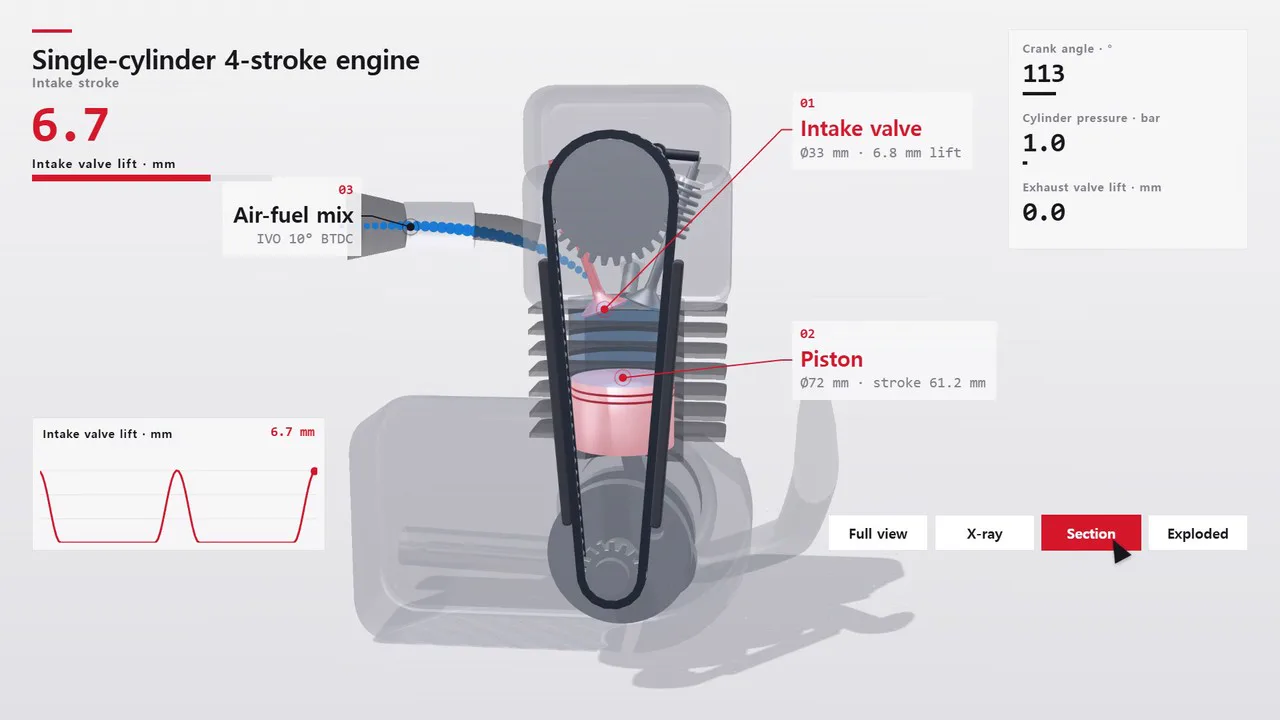
Just enter the name of a machine, robot or part, and it builds a true-to-scale 3D model, spins it in a bright studio, and makes an explainer video that reveals the inside with transparent covers and cutaways.
AI first builds that one machine in code (real dimensions, tooth counts, link lengths), and every scene uses the same model. In each scene, the camera moves in on the part that's currently working and shows the inside with X-ray, cross-section and exploded views, with labels and real numbers attached to each part.
- Show panels (on / off) — When on, number panels for RPM, angle, speed, pressure and more, plus live graphs, change along with the machine's motion, and a cursor clicks the "Full · X-ray · Section · Exploded" buttons as if giving a tour. When off, you get a clean screen with just the machine, shown large.
- The numbers come from the very calculations that drive the model, so what's on screen always matches the motion.
- Results land on the timeline with scene video, narration and subtitles on separate tracks, ready to edit right away.
Great topics
4-stroke, 2-stroke and rotary engines, transmissions, differentials and planetary gears, robot arms, quadruped robots and grippers, aircraft landing gear, pumps, compressors and turbines, watch movements, hydraulic excavator arms, drone motors, Stirling engines, linkage mechanisms.
What you choose when running it
- Machine, robot or part name — e.g. 4-stroke engine, robot arm, planetary gear, landing gear
- Detail — Normal / Medium / Max (higher means more parts and detail, but takes longer)
- Show panels — On / Off
- Length — 90 seconds by default (30 seconds to several minutes)
- Language — Choose English in the production window to get a video with narration, part labels, number panels and mode buttons all in English
How long it takes
This production pack takes a while. AI first designs the machine's 3D model, then draws and records the scenes in code, one batch at a time.
| Detail | 30-second video | 90-second video |
|---|---|---|
| Normal | About 15 min | About 30 min |
| Medium | About 20 min | About 40 min |
| Max | About 40 min | 1 hour or more |
Max adds an extra pass of detail such as bolts, cooling fins and cables to the model, so it takes the longest. You can close the window and keep editing other things while it works.
How to get it
- Log in to ssok.ai and click "Get Production Pack (Free)" above.
- In ssokEdit, go to Production Pack Manager → Market Packs and click Install, or add the downloaded
.ssokpackwith "Import Production Pack File". - On the start screen, choose "Create with Production Pack", pick this pack and enter a machine name.
Requirements
- ssokEdit 1.3.2 or later (Windows)
- Claude connection (install and log in under AI Settings) — Claude writes the 3D model and scene code
- Microsoft Edge (built into Windows) — used to record the scenes
Credits
This production pack is a reimplementation, for the ssokEdit engine, of the 3D simulator approach (bright studio, live number panels, leader lines, cursor tour) from elvarofficial's open-source teardown (github.com/elvarofficial/teardown, MIT). Videos you make with this pack belong to you, and no attribution is required.