 ssok Launcher
 ssokEdit
 ssokIQ
 ssokCLI
 ssokMusic Free
 ssok Keyword Extractor
 ssokPlayer
 ssokKit
 SsokRecorder
Pen & Wash Sketch Production Pack (Free)
A ssokEdit production pack that turns a one-line topic into a travel-sketchbook-style video where pen lines are drawn first and watercolor bleeds in (style originally by LemoLab Lemo-Opuscar)
Free
1-year license from the payment date · 1 PC(s) · Seller: Strokehub Co., Ltd.
Signed-in members can download this for free. Import the pack file (.ssokpack) in ssokEdit → Pack Manager → "Import pack file", or install it directly from Pack Manager → Market packs.
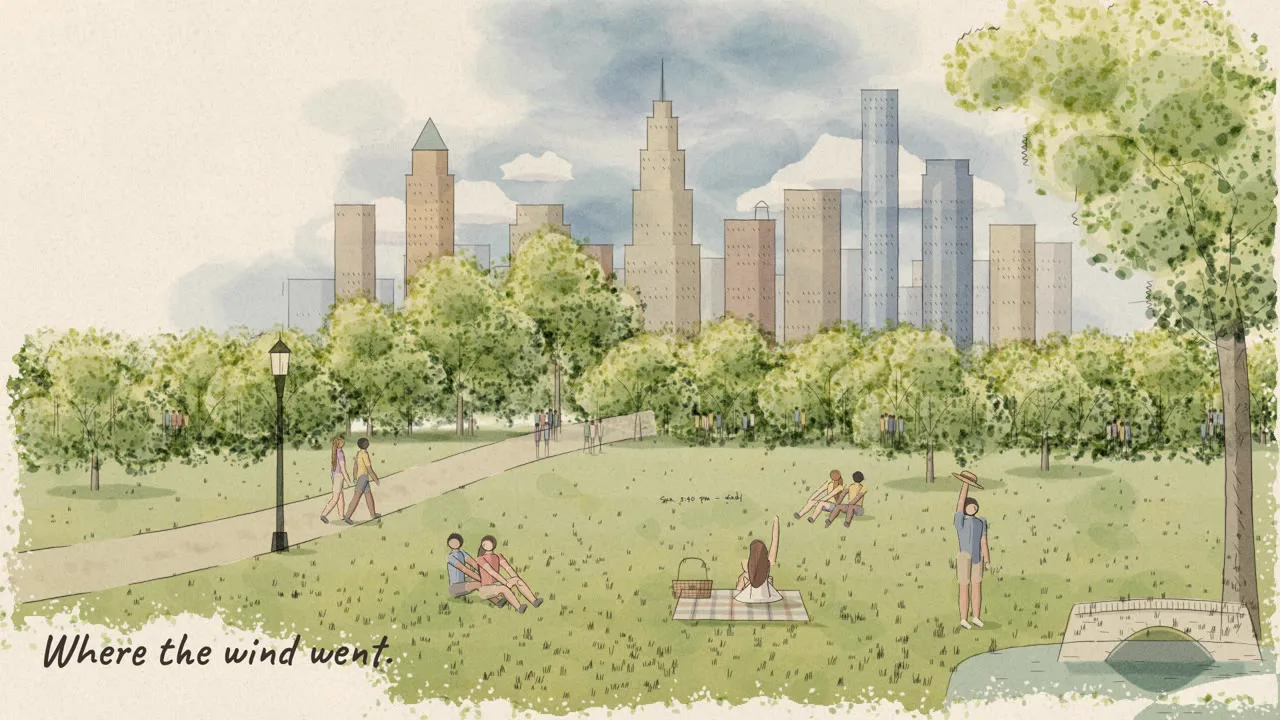
A travel-sketchbook-style video where transparent watercolor sits slightly off-register over wobbly sepia pen lines. Perfect for stories about cities, travel, architecture and neighborhoods.
It looks like a travel sketchbook drawn on location in just a few minutes. Thin sepia pen lines wobble a little, overshoot at the corners and break off midway. Transparent watercolor is laid over them 1–3 pixels off the lines, sometimes bleeding past them, with slightly darker dried edges. The cream watercolor paper is part of the picture, so the paint never reaches the edges; the page fades out in leaf-shaped blots, leaving room for handwritten notes. The line layer and the color layer always stay visibly separate.
- No photos needed — the AI draws every scene directly in code.
- The result lands on the timeline with scene video, narration and subtitles on separate tracks, so you can edit right away.
Good topics
Cities · neighborhood walks · travelogues · architecture and alleys · markets and shops · daily journals · seasonal scenery · lifestyle brand stories
What you choose when running it
- Topic — one line
- Length — 90 seconds by default (30 seconds to several minutes)
- Narration voice and subtitle size can be changed in the production pack settings
How long it takes
The AI draws each scene in code one at a time, so it takes about 6–10 minutes for a 30-second video and 20–30 minutes for 90 seconds. You can keep editing other things while it works.
How to get it
- Log in to ssok.ai and click "Get Production Pack (Free)" above.
- In ssokEdit, go to Production Pack Manager → Market Packs and click Install, or add the downloaded
.ssokpackvia "Import Production Pack File". - On the start screen, choose "Create with Production Pack", pick this pack and enter your topic.
Requirements
- ssokEdit 0.7.1 or later (Windows)
- Claude connected (install and log in from AI Settings) — the original style was built for Claude, so it draws with Claude
- Microsoft Edge (included with Windows) — used to capture the scenes
Credits
This style is an adaptation of LemoLab's open-source Lemo-Opuscar "Urban Sketch · Pen & Wash" (github.com/lemomo-ai/lemo-opuscar, code MIT · style CC BY 4.0), modified for the ssokEdit engine. The cover image is a scene from LemoLab's original demo video (CC BY 4.0, resized only). Videos you make with this pack belong to you, and no attribution is required.