 ssok Launcher
 ssokEdit
 ssokIQ
 ssokCLI
 ssokMusic Free
 ssok Keyword Extractor
 ssokPlayer
 ssokKit
 SsokRecorder
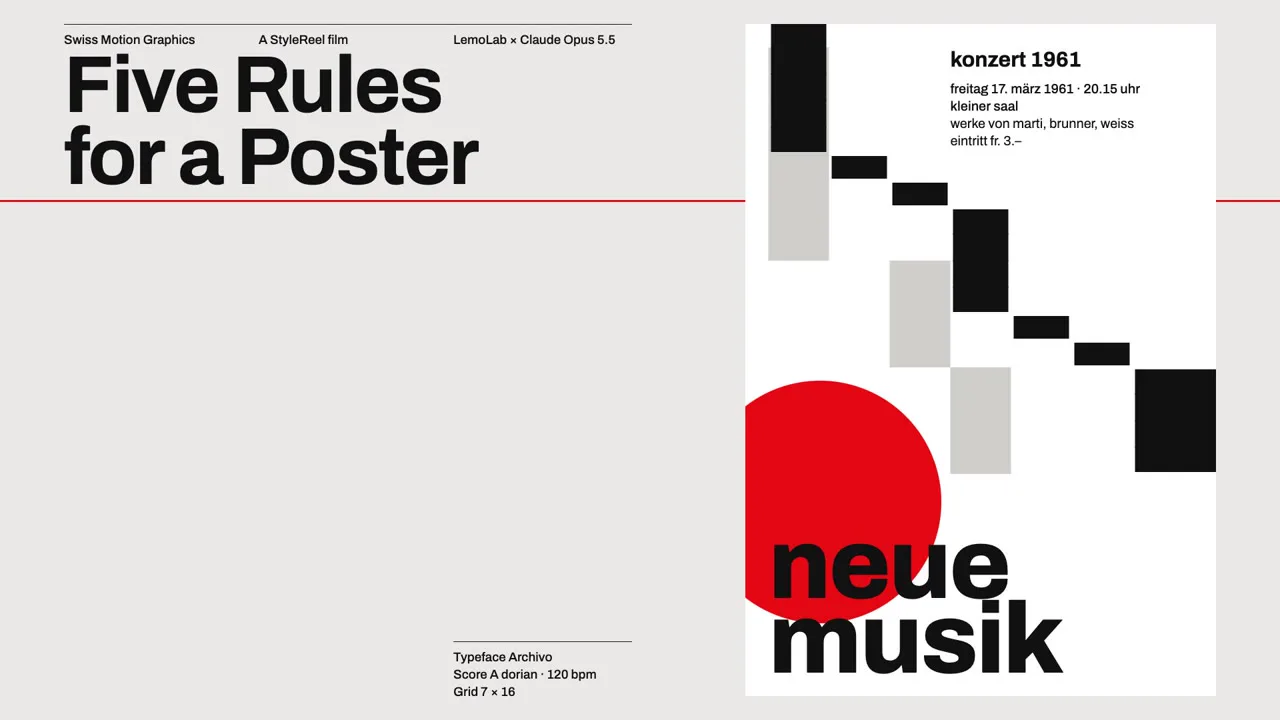
Swiss Motion Typography Pack (Free)
A ssokEdit production pack for Swiss-design motion graphics videos where type and bars snap into place on the beat, using a grid, a single typeface and one signal color (style originally by LemoLab Lemo-Opuscar)
Free
1-year license from the payment date · 1 PC(s) · Seller: Strokehub Co., Ltd.
Signed-in members can download this for free. Import the pack file (.ssokpack) in ssokEdit → Pack Manager → "Import pack file", or install it directly from Pack Manager → Market packs.
Swiss-design motion graphics where black type and bars snap into place on a 12-column grid, right on the beat, and a single signal color is the only thing that breaks the rules. Great for explaining design, brands and systems.
This style brings the International Typographic Style of 1950s–70s Zurich posters to life. A 12-column grid, one typeface, black type and bars, a very light gray, and one signal color (red, orange, ultramarine or green) — that's it. Every element locks to the grid, every movement lands exactly on the beat, and nothing bounces or wobbles. Because the whole screen follows one rule, the single element that breaks it (the signal color) becomes the star. Huge numbers sit beside tiny technical notes — extreme contrast in scale is the signature.
- No photos: the AI draws every scene directly in code.
- The result lands on the timeline with scene video, narration and subtitles on separate tracks, so you can edit it right away.
Good topics
Design principles · brands · systems and rules · map and chart design · timetables · architecture · typography · product feature lists · "N principles"-style videos
What you choose when running it
- Topic — one line
- Length — 90 seconds by default (30 seconds to several minutes)
- Narration voice and subtitle size can be changed in the pack settings
How long it takes
The AI draws each scene in code one at a time, so it takes 6–10 minutes for a 30-second video and about 20–30 minutes for 90 seconds. You can keep editing other things while it works.
How to get it
- Log in to ssok.ai and click "Get Pack (Free)" above.
- In ssokEdit, go to Pack Manager → Market Packs and click Install, or add the downloaded
.ssokpackvia "Import Pack File". - On the start screen, choose "Create with Pack", select this pack and enter your topic.
Requirements
- ssokEdit 0.7.1 or later (Windows)
- Claude connection (install and log in under AI Settings) — the original style was built for Claude, so Claude does the drawing
- Microsoft Edge (included with Windows) — used to capture the scenes
Credits
This style is adapted for the ssokEdit engine from LemoLab's open-source Lemo-Opuscar "Swiss Motion Graphics" (github.com/lemomo-ai/lemo-opuscar, code MIT · style CC BY 4.0). The cover image is a frame from LemoLab's original demo video (CC BY 4.0, resized only). Videos you make with this pack belong to you, and no attribution is required.