 ssok Launcher
 ssokEdit
 ssokIQ
 ssokCLI
 ssokMusic Free
 ssok Keyword Extractor
 ssokPlayer
 ssokKit
 SsokRecorder
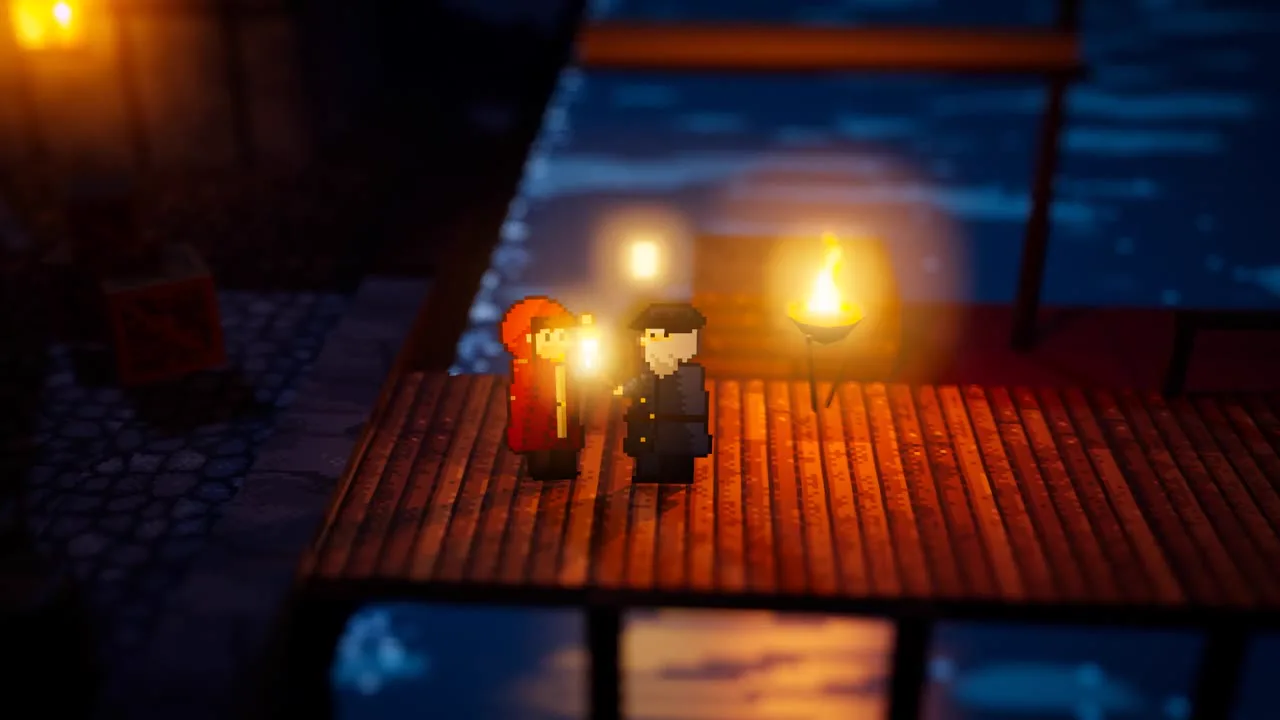
Pixel Diorama RPG Creation Pack (Free)
A ssokEdit creation pack that turns a one-line topic into a video showing a 3D miniature village with pixel-art characters and glowing lanterns, like an RPG scene (art style based on LemoLab's Lemo-Opuscar)
Free
1-year license from the payment date · 1 PC(s) · Seller: Strokehub Co., Ltd.
Signed-in members can download this for free. Import the pack file (.ssokpack) in ssokEdit → Pack Manager → "Import pack file", or install it directly from Pack Manager → Market packs.
An RPG-style video looking down through a tilt-shift lens at a 3D miniature village where pixel-art characters stand like paper dolls. Every lantern casts real shadows, with fog and glowing bloom in the air. Great for fantasy, history, and step-by-step stories.
Paper-doll-like flat pixel characters stand in a 3D miniature village built from boxes and cylinders painted in pixel art. Viewed from high and far away through a tilted lens, only the middle band is sharp while the top and bottom blur. Light is the star — lanterns, campfires, and windows cast the characters' shadows on the ground, fog and dust float in the air, and light softly blooms. Characters move in choppy pixel-art frames, while the camera and lighting move smoothly. On top sit small RPG screen decorations, like chapter title cards.
- No photos needed — AI draws every scene directly in code.
- The result lands on the timeline with scene video, narration, and subtitles as separate tracks, so you can edit right away.
Good topics
Fantasy · Historical stories · How villages and cities change · One person's journey · New-member onboarding · Step-by-step processes (one location per chapter) · Stories about night and light
What you choose when running
- Topic — one line
- Length — 90 seconds by default (30 seconds to several minutes)
- Narration voice and subtitle size can be changed in the pack settings
How long it takes
The AI draws scenes in code one at a time, so it takes about 6–10 minutes for a 30-second video, and 20–30 minutes for 90 seconds. You can keep editing other things meanwhile.
How to get it
- Log in to ssok.ai and click 「Get Creation Pack (Free)」 above.
- In ssokEdit, go to Creation Pack Manager → Market Packs and install it directly, or add the downloaded
.ssokpackvia 「Import Creation Pack File」. - On the start screen, choose this pack under 「Create with Creation Pack」 and enter your topic.
Requirements
- ssokEdit 0.7.1 or later (Windows)
- Claude connection (install and log in under AI Settings) — the original style was designed for Claude, so scenes are drawn with Claude
- Microsoft Edge (included with Windows) — used to capture scenes
Credits
This art style is adapted for the ssokEdit engine from LemoLab's open-source Lemo-Opuscar 「HD-2D」 (github.com/lemomo-ai/lemo-opuscar, code MIT · art style CC BY 4.0). The cover image is a scene from LemoLab's original demo video (CC BY 4.0, resized only). Videos you make with this pack are yours, and no attribution is required.