 ssok Launcher
 ssokEdit
 ssokIQ
 ssokCLI
 ssokMusic Free
 ssok Keyword Extractor
 ssokPlayer
 ssokKit
 SsokRecorder
Balance Game Production Pack (Free)
A ssokEdit production pack that turns a one-line topic into a balance game Short, with two options facing off and a countdown ticking.
Free
1-year license from the payment date · 1 PC(s) · Seller: Strokehub Co., Ltd.
Signed-in members can download this for free. Import the pack file (.ssokpack) in ssokEdit → Pack Manager → "Import pack file", or install it directly from Pack Manager → Market packs.
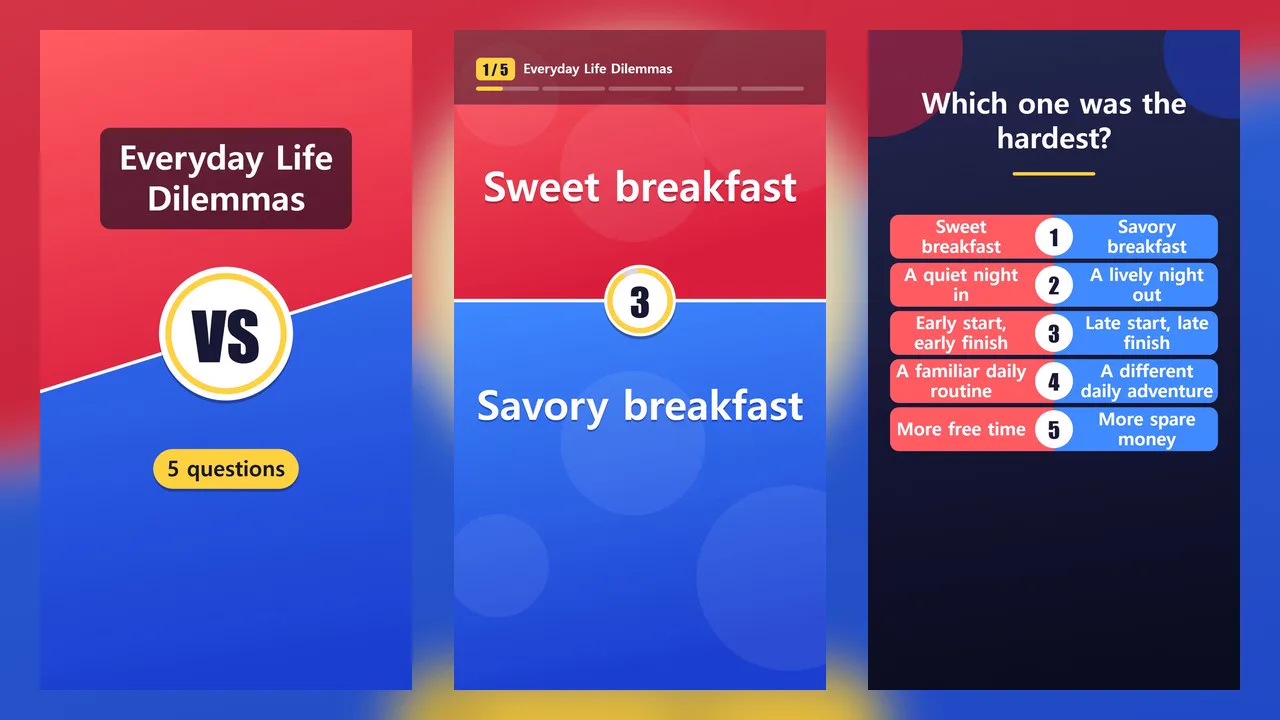
Enter a single-line topic and get a "Would You Rather" video with two options facing off and a countdown ticking.
Viewers watch the screen and pick one of two options. There's no right answer and no winner. The video uses only text and shapes, no photos, and since the AI doesn't write scene code, it's fast and the layout always comes out the same.
- Split screen — Split top/bottom in vertical, left/right in horizontal, with the two options shown large on two contrasting colors. A VS badge sits in the middle
- Narration — Reads the two options as "A vs. B"
- Silent countdown — The VS badge turns into a 3 · 2 · 1 countdown while viewers make their choice
- Locked in — The two sides flash in turn and "Tell us in the comments" appears. The video doesn't show which side won
- Next question — The two sides of the new question slide in from both edges. A progress bar at the top shows which question you're on
- Final screen — "Which one made you think the hardest?" plus a list of all the questions
- Your questions, word for word — If you enter questions, they're used exactly as written
- Head-to-head comparison — Pins the names of two contenders to each side and shows the categories and values you enter, one row at a time
- Three themes — Red Blue · Yellow Purple · Mint Coral. Vertical and horizontal
- The result lands on the timeline with video, narration and subtitles on separate tracks, ready to edit
Options when running
- What the game is about — e.g. Office worker lunch edition
- Mode — Would You Rather / Head-to-head comparison
- Your questions — Optional. One per line, up to 10.
Option A | Option B - Comparison table — Required for head-to-head. First line
Name | A name | B name, thenCategory | A value | B valueper line, up to 10 lines. Add| Aor| Bat the end of a line to put a check mark on that side - Number of questions — 3 / 5 / 7 (when the AI writes the questions)
- Countdown — 3 sec / 5 sec
- On-screen title · Screen colors
- Length — Set by the number of questions and the countdown. 5 questions with a 3-second countdown runs about 45 seconds
Good to know
- Read through AI-written questions before posting. If you don't like one, fix it in the "Your questions" field and generate again.
- The AI is set not to write questions about real people, brands, or that divide groups of people. Text you enter in "Your questions" appears as-is, so please review it yourself.
- Head-to-head values appear exactly as you entered them. The AI doesn't create or change values; it only writes one sentence per row restating the two values. If that sentence drops a value or includes a number not in the table, it's discarded and a fixed line in the form "Category, A name value, B name value" is read instead. Still, the narration is AI-written and may sound awkward or be wrong, so listen before posting.
- Check marks appear only on rows where you wrote
| Aor| B. Without them, nothing indicates which side is better. - In Would You Rather mode, the lines that read the two options have no subtitles, since the same text is already shown large on screen.
- Options look best at 14 characters or fewer. Longer ones are shrunk and wrapped onto multiple lines.
- Photos and logos aren't included.
- Choose English as the language in the run window to make an English video. AI-written text, narration and fixed on-screen text (선택 완료 → Locked in, 댓글로 알려 주세요 → Tell us in the comments, etc.) all appear in English.
Requirements
- ssokEdit 1.3.2 or later (Windows)
- Microsoft Edge (included with Windows) — used to capture the screen